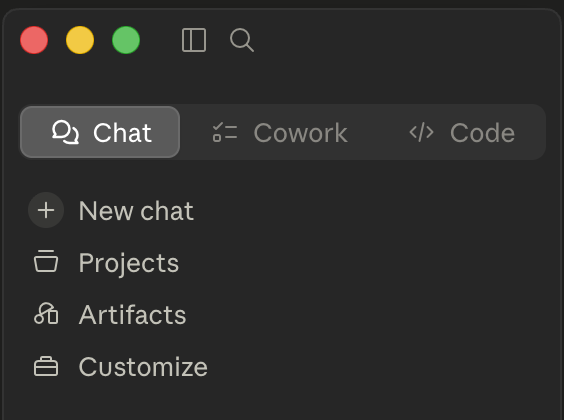
There are three ways to work with Claude, and the most common beginner mistake is starting with the wrong one. They are not better-and-worse; they are built for different jobs. Pick by what you are trying to do. This guide is the front door: it points you to the right surface, explains what things cost, and shows you which model to use when.
Start here, then follow the link to the setup guide for whichever fits.
The 30-second answer
- You want answers, drafting, or a thinking partner. Use Chat. No setup, you just type.
- You want Claude to actually work on your files (reconcile, organize, draft from your templates) without a terminal. Use Cowork.
- You want the most powerful version and don't mind a terminal. Use Claude Code.
Most people should start with Chat, do real work, and move up only when they hit its limits. You do not have to use all three.
How the three compare
| Surface | Best for | Works on your files? | Technical level | Set-up guide |
|---|---|---|---|---|
| Chat | Q&A, drafting, research thinking, learning | No, conversation only | None | Chat guide |
| Cowork | Working on real files: reconciling, organizing, drafting from templates | Yes, from a normal app window | Low | Cowork guide |
| Claude Code | The deep end: multi-file work, automation, full control | Yes, via the terminal | Higher | Claude Code guide |
A natural path is Chat, then Cowork, then Claude Code, adding power as you get comfortable. Many accountants never need to leave Chat and Cowork, and that is fine.
What it costs
Two different ways you might pay, and they feel very different:
Subscription (how most people use Claude). A flat monthly plan (Pro, Max, Team, or Enterprise) with usage limits that reset, not a per-message charge. You are not watching a meter; you are managing a quota. The lever here is simple: don't burn your limited high-end usage on trivial work. Draft the routine email or summary, then save the heavy lifting for the hard problems.
Usage-based / API (for building and automation). If you wire Claude into a tool or workflow, you pay per token (roughly, per word in and out). Here cost scales with how much text goes in and out and which model you use, so the model choice below matters directly.
One more thing your plan choice decides, and for an accountant it is the big one: your data terms. Personal plans (Pro, Max) run on consumer terms; Team and Enterprise run on commercial terms that contractually exclude your inputs from model training. If you intend to put real client data into Claude, that alone is the reason to choose Team or Enterprise. The full rule is at the bottom of this guide.
Either way, the biggest day-to-day cost lever is matching the model to the task, which is the next section.
Which model, when
Claude comes in four models. Think of them as a capability-and-cost ladder, most capable (and most expensive) at the top:
- Fable 5: the highest-capability model. Reach for it on the genuinely hard reasoning.
- Opus 4.8: the strong default for complex work. If you are unsure, start here.
- Sonnet 5: the balanced everyday workhorse. Great for most drafting and analysis.
- Haiku 4.5: the fastest and cheapest. Ideal for routine, high-volume, simple tasks.
(Model facts here were verified against Anthropic's pages on July 1, 2026. Models and prices change fast, so treat Anthropic's own model chooser and pricing page as the current source, not a number in a guide.)
How to actually spend your capability (and your budget):
- Use the top model on the one-way doors. The hard, high-stakes calls, a thorny nexus question, structuring a complex transaction, a research memo where the analysis is genuinely difficult. Not on formatting a letter.
- Compress first with a cheaper model. Have a fast model summarize and organize source documents, then bring the distilled version to the top model. You pay top-tier rates on far less text.
- Design with the best model, execute with a cheaper one. Let the strongest model write the plan, checklist, or procedure; run the routine passes on Sonnet or Haiku.
- One good session shapes hundreds of routine ones. Use the top model once to write your reusable Projects, skills, and templates. Then all your everyday, cheaper-model work rides on that foundation. The cost of that one session amortizes to almost nothing.
Everyday default: Sonnet 5 or Haiku 4.5 for routine work, Opus 4.8 or Fable 5 for the hard problems. That single habit is the difference between a plan that feels generous and one that feels tight.
The one rule all three share
Whichever surface and model you pick, the client-data rule is the same, because in all three, putting information in sends it to Claude's servers.
- Personal plans (Pro, Max): treat as consumer terms. Anonymize. Use "CLIENT," "$X," "[STATE]." (Consumer training/opt-out terms change, verify Anthropic's current terms.)
- Team or Enterprise: commercial terms exclude your inputs from training and include a data processing agreement. Real client data is permissible, but you still need a §7216 basis for the disclosure and your WISP to cover the tool.
- Every tier, no exceptions: never put an SSN or EIN into any of them. That is the floor.
Before real taxpayer return information goes into any Claude surface, remember IRC §7216: it can require the client's written consent. When in doubt, anonymize. The Safe-Use Planner checks your path before you start, and the Redactor strips identifying details in your browser first.
Then get set up
Pick your starting surface and follow its guide:
- Claude Chat: start here if you are new.
- Cowork: when you want Claude working on your files.
- Claude Code: when you are ready for the deep end.
Bringing your team along? The workshop guide turns this same setup into a session you can run for your whole firm.
Your first week
Setup is not the goal; the habit is. One task a day, all safe with placeholders:
- Day 1 (Chat): draft one real client email using CLIENT and $X, then compare it to what you would have written from scratch.
- Day 2 (Chat): take a question you actually have this week and ask Claude to structure the research: the sub-questions, the authority to check, the order to work them. Verify any cite before you rely on it.
- Day 3 (Chat): create one Project (client emails is the easy first one) so tomorrow's work starts with your context already loaded.
- Day 4 (Cowork): point Cowork at a folder of templates or internal docs and have it draft or organize something from them.
- Day 5: pick the task that saved you the most time and save the prompt that produced it. That prompt is your first reusable asset.
And the rule that sits above all of it: Claude drafts, organizes, and accelerates. You review, decide, and sign. You are always the reviewer of record.